A tale about design: part two
Last summer, at GCDS, I had some very pleasant developer-designer interaction experiences. I blogged about this. A week ago the annual Libre Graphics Meeting was organized in Brussels and again there was a very good cooperation between designers and developers. This post describes my experiences there and is the second in a hopefully long series of posts on why it matters for developers and designers to work together.
Visions and goals
A couple of weeks ago I inherited the maintainership of F-Spot. One of the first things I wanted to do was to set out a new direction for F-Spot, to get the development momentum going again and to reconsider our assumptions. F-Spot has a lot of nice and not-so-nice aspects, it’s time for us to set the goals high, be ambitious and go from good to awesome.
While speaking about this with Peter Sikking (interaction architect and over here probably most known for his Gimp UI design work), he correctly noticed that we should have a clear vision first before redesigning things. We sat down and started working on this.
Maybe working isn’t the right term here: working with Peter means having an enjoyable chat where he asks you a couple of questions, which gradually help you crystalize the vision. At the end he grabs his laptop, spends fifteen minutes alone typing and out comes a great vision statement, which neatly sums up what I had in mind:
F-Spot is a cross platform application for organizing thousands of photos. It shuns ‘organizing in folders.’ instead, metadata is the basis for viewing and drilling down the collection. Adding and maintaining metadata is easy and enjoyable in F-Spot.
Individual photos can be retouched and globally corrected (e.g. dynamic range, color), for sharing via the net, printing and viewing by consumers. The number and sophistication of the correction scales to the the ambition of users. An advanced form of corrections is that of batches of photos.
Beginners in the digital photo field can easily start using F-Spot. These and more advanced users are encouraged by F-Spot to grow their skills, to the point where they integrate more specialized photo manipulation software into their F-Spot workflow.
The key ideas here are usable for nearly anyone, yet powerful for those who want it, with a gradual path to grow from beginner to advanced photographer. This vision will serve as a test for all new features: what doesn’t fit in won’t get in.
Spend some time doing this for your project, it will greatly help your project. I highly recommend Peter to anyone that considers working with him.

Interaction architect Peter Sikking
Design, user interface and maintainters
The next day I sat together with some of the great designer heroes of our GNOME community: Garrett LeSage, Jakub Steiner, Hylke Bons and Andy Fitzsimon. Together we started thinking about how we could redesign the user experience of F-Spot. There are no showable results yet (aside from some paper sketches), but I am very impressed with what came out of this session: a clean and powerful experience for organizing photos. Best of all: it’s not the obvious programmer solution. Having designers in the conversation (in this case a lot of them) allows you to think beyond the obvious. It brings in a lot of design creativity which we developers sometimes lack.
Hylke made a very correct observation: every project should ideally have a code maintainer and a design maintainer. I’ve come to agree with this.
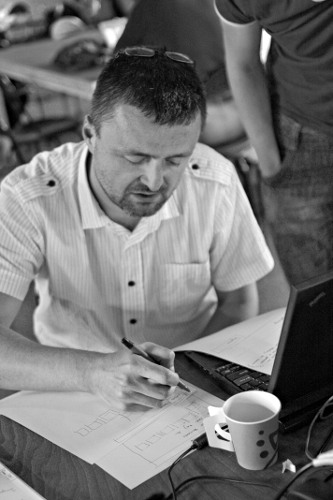
Jakub Steiner (jimmac) working on awesome designs.
Take-away points
What to take away from this:
- Get the goals and vision of your project straight. This greatly helps the focus and makes it so much easier to make decisions.
- As a developer maintainer, talk to designers, they will make it so much better. This is often a problem, where maintainers see their projects as their pets. Letting someone else co-decide on the design won’t diminish your merit but it will often greatly improve your project.
- Credit in open-source projects is usually given based on code contributions / documentation / translations. We need to value design more and show them love too.
Fortunately, most of these points are already common practice in parts of the GNOME community.
As for the changes to F-Spot: these are coming, along with massive improvements (in terms of performance, code quality, stability, etc). That’s the subject of another blog post in the near future though.
Related
- A tale about design (July 17, 2009)
- F-Spot 0.6.2 Released! (May 14, 2010)
- Hackfests (February 26, 2010)
- Photo support for TagLib# (November 2, 2009)
- Summer of Code 2009 (September 9, 2009)