After a month of intense hacking, we have just released F-Spot 0.7.0, the first release of the unstable 0.7 series, which will lead up to a stable 0.8.0 in September. This means radical changes, possible breakage (which we try to avoid) and generally a lot of progress.

The goal of thus cycle is to replace as much code bits by Banshee-code (where possible), clean up, refactor, blingify. All of this will make it much more stable and hackable, allow us to solve some of our long standing issues (performance / memory usage) and do more radical changes (on the UI and internally).

Highlights of this release
Import has been rewritten completely, to make it more hackable and less crash-prone. Along with that, there is now duplicate detection that actually works. Another side effect is that it should be much faster and use a lot less memory (unless you are importing from a PTP camera, that’s quite slow currently, I recommend a cardreader).
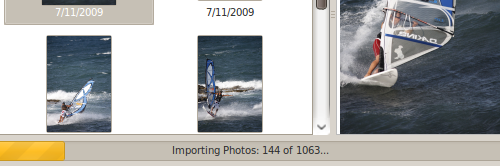
Faster import

Much faster and less memory hungry import, with duplicate detection that works flawlessly

Anton Keks implemented reparenting and detaching of versions. This means that you can combine multiple similar photos (e.g. bursts of photos). You can also detach versions of a photo into a separate photo. Very handy to organize large amounts of very similar photos.
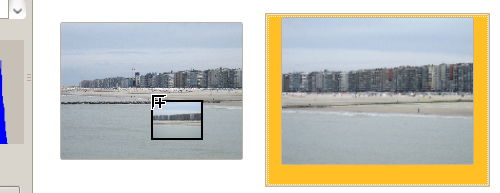
Reparenting

You can combine photos by simple drag-and-drop.

It is now possible possible to select photos by mouse drag and to pan around in photos using the middle mouse button. To very basic features that were missing for way too long. Facebook support has been fixed and there is a brand new user manual. And finally, we’ve seen a large amount of code being replaced by the Hyena (part of Banshee) equivalents (this is an ongoing process) and there were over 100 bugs closed. A full overview of all the changes can be found in NEWS.

What’s next?
In the next release we’re planning to continue our current effort. One of the highlights you can expect is a brand new and extremely tested metadata layer we’ve been building for almost a year now. It will also bring more performance and stability improvements plus plumbing work that will allow us to build really exciting new things. More on that in the recent meeting minutes.

Where to get it
Download F-Spot 0.7.0 from GNOME FTP. OpenSUSE users can get packages using the open build service, in GNOME:Apps:F-Spot:Unstable.

More info
More info can be found in the full release announcement. This release would have not been possible without all the people that contributed to it. Many thanks to them. A full overview is in the announcement.

Want to help out?
F-Spot is made by you. Yes, you! If you want to help out, come and talk to us on #f-spot on irc.gnome.org or on our mailing list. We are there to help you out. Absolutely no inspiration where and how to start? We have easy tasks with instructions to make your first steps.

16 Responses to “F-Spot 0.7.0 Released!”

  1. mike

    Congrats :)

    Will work for the stable version though, since I want the full glory ;)

    Reply
  2. z

    go go go! :-)
    Would love to see automatic photofolder syncing, like banshee does with music.

    Reply
  3. Mike

    Very excicted. Unfortunately it crashes on my Debian Squeeze. Alsa with a free profile, it crashes every time I try to import a photo.

    Reply
  4. Matthew

    Can we move instead of copy on import yet? I think that bug is 6 years old.

    Reply
  5. Michaël

    If the 0.7 series is ‘unstable’, why does the f-spot website point to 0.7.0 for everyone to download?

    Reply
    • Author

      Ruben

      Good question. I’ve been planning to replace the website, where we’ll make a clearer distinction between stable and unstable. That being said, we currently only offer source tarballs on the website, people who compile usually want unstable anyway.

  6. mem

    I’ve used F-Spot for quite a while and greeted the release of 0.7 gladly, although I haven’t had much chance to play with it. I’ve found f-spot to be better than the other photography applications out there: the interface is clean and easy to use, and it generally doesn’t get in my way. That said, I confess I’m kind of hoping for some workflow improvements in f-spot, and I’m going to bore you with a couple of the ideas here.

    Most of my desires revolve around the Browse window. I don’t expect (or really want) advanced editing controls (you’ve got programs like the Gimp for that), but I would like some more control over what I look at as soon as the application starts.

    I do a fair amount of organizational work on my netbook (not so much editing, mind you), and so some of this is motivated not just by speeding up the photo-finding process, but also the photo-loading process.

    For example, I’d like a legitimate calendar view of my pictures, not a slider-bar for the time line. It’d be nice if there were a thumbnail (or thumbnails) of a picture (or pictures) taken on a particular day, and an option to strike days out of the calendar that don’t have anything taken on them. Rather than only getting a tag/gallery view, you have a better capsule summary of days. It would be great if the search could be restricted via the slider bar such that you could grab a particular year or month. The Find->Import Album option really isn’t quite the same, and it’s not as useful (precisely because it’s not in the Browse screen).

    Another handy feature would be having a browse window that showed tags in a fashion similar to albums. From a real estate perspective, it allows me to turn off the side bar entirely and helps reduce the expensive rendering process for the several thousand images I can browse at any given time. It also feels a bit more like album browsing, a metaphor I think would be helpful.

    In that regard, it would also be really handy to be able to combine the two views such that you could drill down in the tag view by date. It’s not unusual, for example, for me to regularly update the same Picasa album online by selecting tagged images. If I want to share my favorite images, for example, I don’t want to upload multiple copies of the same image. Providing an automatic selection by import date would be really useful.

    Another handy feature would be an intuitive keyboard-based rating system. For example, hitting r-1 would rate an image as one-star. R-2 would work similarly all the way to r-5 or however many stars you really want to have on an image. Naturally it would be great to have a corresponding filter shortcut, e.g., f-3 would show items rated three stars or higher.

    As a final highly unlikely wish, it would be nice to have some batch processing commands—perhaps an interface to ImageMagick?—that could be applied fairly easily. It would help improve workflow if sane defaults could be used for color equalization or contrast enhancement, for example, or even just adding an image comment.

    Thanks for the ear! I love what you guys have done, and I can’t wait to see how it progresses.

    Reply

Leave a Reply

  • (will not be published)